NEW! Download a child theme with the same code already integrated for you. [download id=”12″ format=”2″]
Extending the user profile just got easier. With ClassiPress 3.1 you can now add fields to the user profile directly from your parent theme or child theme functions.php file. Simply add the following code to your functions file and it will automatically give you an additional field for PHONE NUMBER, which should be a critical part of more Classified Ads websites.
add_filter('appthemes_extended_profile_fields', 'sm_add_profile_fields');
function sm_add_profile_fields($fields){
$fields['phone_number'] = array(
'title'=> __('Phone Number:','appthemes'),
'type' => 'text',
'description' => __('Enter your phone number to allow others to easily contact you by phone.','appthemes')
);
return $fields;
}
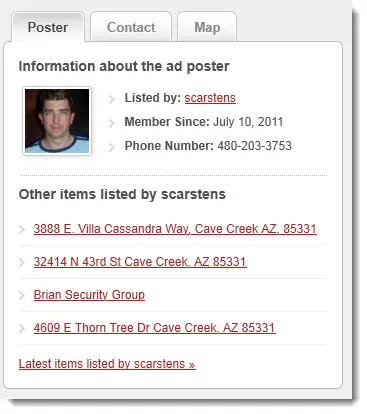
Fantastic! Now my users can enter there phone number into there profile. Hey wait a minute. Why isn’t the phone number showing up on the site anywhere except on there edit profile page? Well, that’s because there is a second step. Step 2 of the process is to modify an existing page to enhance it with the new information. In this example we are going to modify the “SINGLE” ad page, where there are 3 tabs next to the add and 1 of them gives the posters information. You would expect to find the phone number of the poster here right? Right!
Now open up, or create in your child theme “sidebar-ad.php”. Next you will want to find the HTML that starts with “<ul class=”member”> and you will want to make it look like this:
The most important part of the above code is the following line:
When your done, the single page should have a sidebar that looks something like this: