
PLUGIN NAME: SM Debug Bar
DOWNLOAD VERSION 1.2
Author’s name: Seth Carstens
Author’s URL: http://sethmatics.com/
URL of ZIP file: https://downloads.wordpress.org/plugin/sm-debug-bar.1.2.zip
Plugin Homepage: http://sethmatics.com/extend/plugins/sm-content-widgets
Official WordPress Plugin Page: https://wordpress.org/plugins/sm-debug-bar/
Rating out of 5: 0
List of tags: admin bar, debug, developer, php, print_r
Version number: 1.2
EASY TO USE! Developers who build plugins and themes everyday know the constant hassle of finding the proper place to print out PHP variables and objects to see whats going on. This plugin will help you with that process by giving you a simple function to call, that automatically appends a printed version of your variable/object/array and sends it to a hidden DIV that only loads when the admin bar loads, and only loads when logged in with administrative permissions in wordpress.
So whats the catch? Well, using utilities like this always prooves difficult because knowing how it works is often complex. We have simplified the process as much as possible. Here is an example:
USAGE -> Quickstart: Open any php file that you know is being loaded and add “dbug($GLOBALS)” to print all global variables.
1. You built a new array thats holding some custom meta data loaded on the page.
2. For some reason, you think its empty, or the values are not acting like you expect.
3. Next step is typically to print it out right?
4. With this plugin activated, simply add the following to your file without the quotes “dbug($myarray);”
5. Maybe its 4 arrays and a string you are trying to follow, no problem “dbug($myarray1); dbug($myarray2); dbug($myarray3); dbug($myarray4); dbug($mystring1);”
6. Now load the page, click the “Debug” link at the top of the screen, watch the debug menu slide out, and notice all your variables are printed nicely for your viewing.
Plugin provided by http://sethmatics.com/.
Features include:
- Secured so that only logged in administrators can ever see the Debug panel.
- Ability to append as many variables for printing as desired.
- Now COMPLETELY compatable with the premium “ClassiPress” theme which can be purchased at ClassiPress
- Enter a set of “watched” variables you want printed so that you can view them without FTP (for portable developers)
- Added some jQuery collapse/expand functions to watched array variables
Features Coming soon:
- jQuery styling and enhanced array viewing by animated “tree” like array exploring. Navigate your arrays like you would a files and folders.
- code coloring – we realize grey and white is boring and difficult to read when you have alot of it. We plan to take care of that.
- plugin options – currently we are not allowing any options to be chosen, but setting color formats, capabilities that can view the panel, and more.
- ability to choose (by checkbox) standard wordpress variables to watch and track instead of all variables requiring manual entry.
Don’t forget to rate our plugin so we know how we are doing!
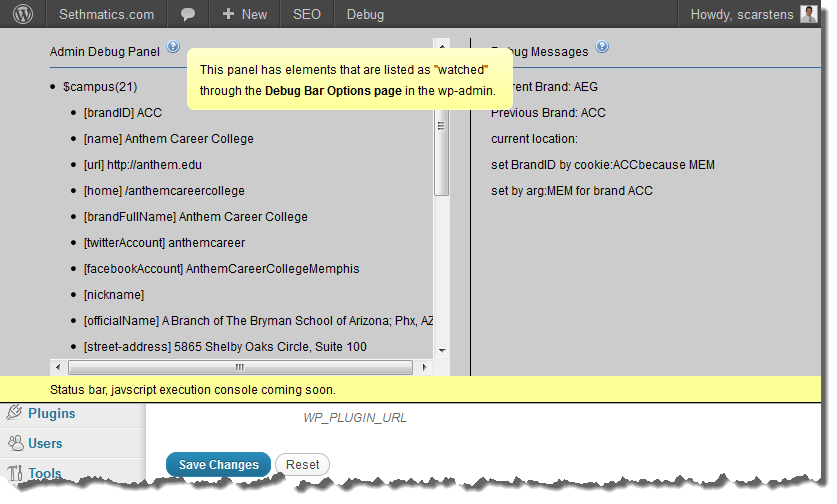
A sample of the debug bar with variables printed.

Admin Panel Options (1.0.2)
Sethmatics Inc.
- Phone: (480) 203-3753
- Website: www.sethmatics.com

Recent Comments